Frequently asked questions
Everything people ask about syncing music to an indoor cycling workout.
What is IntervalRadio?
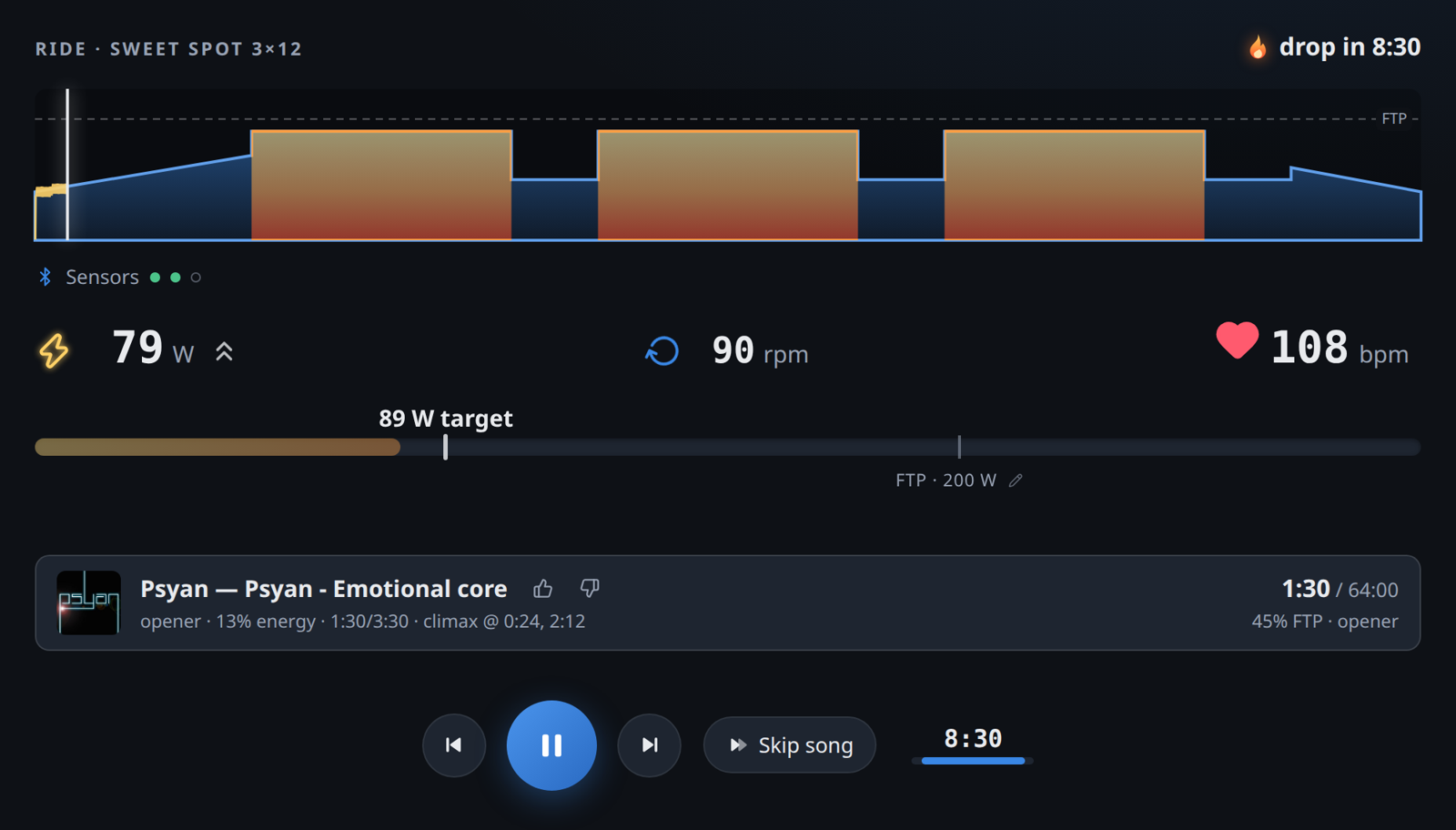
IntervalRadio is a free web app that synchronizes music with indoor cycling workouts. It analyzes each song's energy and drop locations, then plans the soundtrack around the workout so calm tracks play in the recoveries and drops land exactly on the hardest intervals. It also controls smart trainers in ERG mode, records rides, and uploads them to Strava — in the browser, nothing to install.
Is there an indoor cycling app that syncs music to your workout?
Yes — IntervalRadio is a free web app built for exactly this. It reads your structured workout in advance, analyzes each song's energy and where its drops are, and plans the soundtrack so calm tracks play through the recoveries, high-energy tracks carry the efforts, and a song's drop lands exactly when the hardest interval begins. It runs in your browser — nothing to install.
How does IntervalRadio match the music to my intervals?
Every track is analyzed automatically: loudness and bass curves, tempo, beat grid, and drop locations. The workout file declares every interval, ramp, and recovery in advance, so the planner composes the ride like a DJ set: it marks the hardest efforts as anchors, picks songs whose climax can arrive exactly at those moments, keeps recoveries deliberately calm, and saves the strongest song for the final effort. The plan is recomputed live on every skip or seek, so the alignment holds even if you change music mid-ride. The full algorithm is described here.
Does it work with Zwift?
Yes. IntervalRadio runs alongside Zwift as a companion: sign in with
Zwift to load your custom workout library and FTP, or load any
.zwo file directly. Pick the same workout in both apps and
start them together — the drops land on your intervals while Zwift does
the visuals.
Can I use it with TrainerRoad, TrainingPeaks, or Garmin workouts?
Mostly. IntervalRadio accepts structured workout files in
.zwo and .fit format. TrainingPeaks exports
those directly, Garmin Connect workouts can be exported as
.fit, and most platforms offer one of the two. TrainerRoad
does not offer workout export — but TrainerRoad workouts are simple
%FTP blocks, so rebuilding one in the workout editor takes a couple of
minutes. There is also a built-in workout library if you just want to
ride.
Can I create my own workouts or edit existing ones?
Yes. A text-based editor lets you write workouts from scratch in a simple interval notation, and every workout — built-in, imported, or shared — can be opened and edited to suit your training. Your creations are saved to a personal library, and any workout can be shared as a link that opens IntervalRadio with it preloaded.
Do I need a smart trainer?
No. The music syncing works with any setup at all. With just a power meter (crank, pedal, or hub) on a regular non-smart trainer you additionally get live power and cadence, target guidance, ride recording, and Strava upload. A smart trainer adds ERG mode on top, where the resistance is controlled for you.
Does it sync to Strava?
Yes, directly. Connect Strava once and every finished ride uploads
automatically — with the workout name, the number of drops you rode,
and a link to the exact workout so others can ride it too. You can also
download every ride as a standard .fit file.
Where does the music come from — can I use my own?
Three sources: a starter set of trending tracks that loads automatically on your first visit, two searchable open streaming catalogs (Audius and Jamendo), and your own MP3 files. Your own files are analyzed locally in the browser and never leave your device.
How is IntervalRadio different from Spotify or RockMyRun?
Spotify plays music but knows nothing about your workout — the timing of songs is luck. RockMyRun adapts licensed mixes to running cadence or heart rate, but cannot align music to a planned interval structure. IntervalRadio reads the workout in advance and schedules individual tracks so their drops land exactly on the hardest efforts — which requires per-track analysis and playback control that commercial streaming licenses don't allow. It's free and complements a music subscription rather than replacing it.
Can I use Spotify or Apple Music?
Not currently. Spotify and Apple Music do not license their streams for this kind of playback control, and beat-accurate alignment needs direct access to the audio. IntervalRadio instead streams from open catalogs and plays your own MP3s.
Does it work on iPhone, iPad, or Safari?
The music works everywhere, including iPhone and iPad — playback continues with the screen locked, with media controls on the lock screen. Trainer control, heart rate, and power meters need Web Bluetooth, which exists in Chrome and Edge on Windows, macOS, Android, and Linux — but not in Safari or any iOS browser. So: ride with full sensors from a laptop or Android device, or enjoy the synced music from any phone.
Does it control my smart trainer?
Yes, optionally. Connect a smart trainer over Bluetooth and ERG mode holds the target power of every interval while the music follows the same clock — the watts and the drop arrive together. Heart rate straps and power meters are supported too, and power-meter matching runs automatically.
Is IntervalRadio free?
Yes. It is currently in a free testing phase: nothing to install, nothing to pay. It runs in your browser.
Does it record my ride?
Yes. Power, cadence, and heart rate are recorded during the ride and can
be exported as a standard .fit file or uploaded straight to
Strava when the ride ends.
Something not answered here? Write to feedback@intervalradio.com or use the Feedback button in the app. Curious about the internals? How the drop finds your hardest interval. Looking for an AI-based coaching solution? Try TriPeak.